Grundlagen der Informatik on MacOs
Prerequisites
Install homebrew
Install UV
- Install UV
brew install uv
- Verify the installation:
uv --version
- The output should look like this:
uv 0.10.4
Install Git
- Install Git:
brew install git
- Verify the installation:
git -v
- The output should look like this:
git version 2.51.0
Install IntelliJ
- Install the JetBrains Toolbox
- Open JetBrains Toolbox and click “install” on “IntelliJ IDEA”.
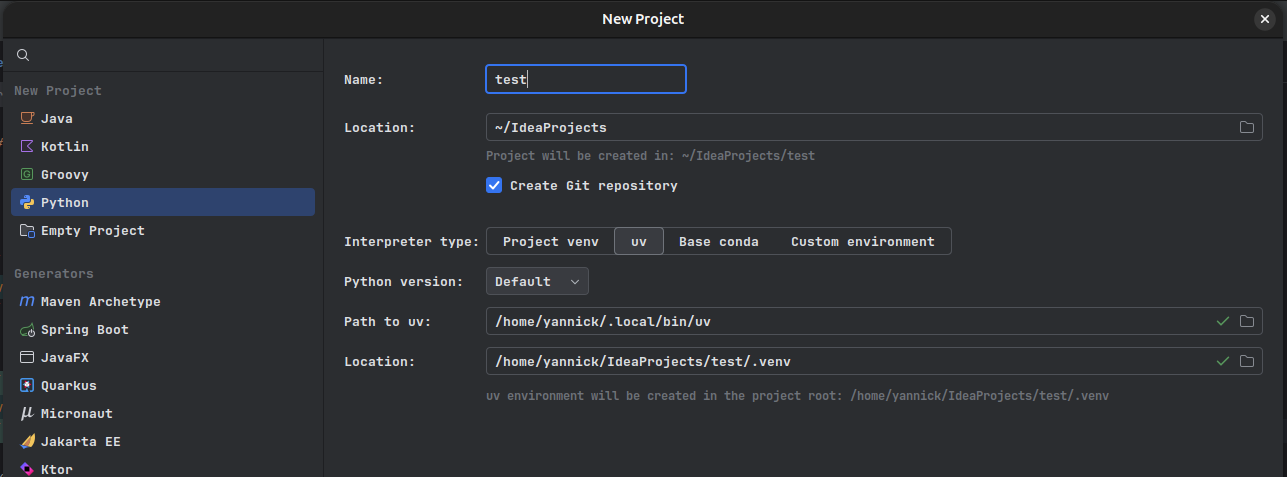
- Open IntelliJ and create a new Python project:
- Name: test
- Location: “~\IdeaProjects”
- Interpretor type: “uv”
- Python version: default
- Path to uv:
DO NOT CHANGE - Location:
DO NOT CHANGE
- In your new project: create a file called
helloWorld.py - Add the code
print("Hello World") - Right click on the file and click
Run 'helloWorld'